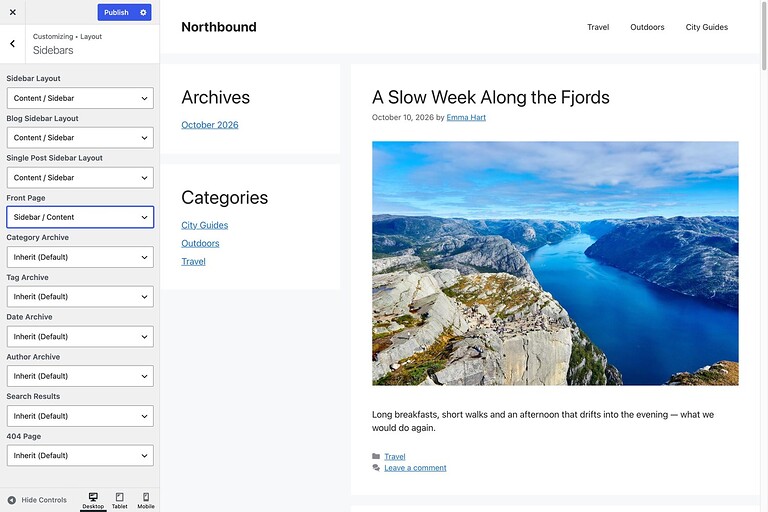
Enhance for GP (EFGP) adds extra options to the GeneratePress Customizer. You can change sidebar layouts per page type, tidy up blog lists, control single posts and the comment form, rename search and menu labels, adjust the footer and replace the theme icons.
EFGP has no settings page of its own. Every option lives in Appearance → Customize. It works with the free GeneratePress theme: GP Premium and GenerateBlocks are not required.
Requirements in brief
- WordPress 6.4 or newer.
- PHP 7.4 or newer.
- GeneratePress 3.x, active as the theme or as the parent of your child theme.
- A licence key. See Getting started.
The options only appear in the Customizer while GeneratePress is the active theme or the parent theme.
Where to find each option
| Customizer path | What you can change | Guide |
|---|---|---|
| Appearance → Customize → Theme Design | Switch between your own settings and the design a child theme ships with | Theme design |
| Layout → Sidebars | Sidebar layout for the front page, archives, search and 404 page | Sidebar layouts |
| Layout → Blog | Clickable posts, image size, hidden meta items and posts per page in lists | Blog and archive lists |
| Layout → Post | What single posts show, byline avatar, author box, comments area | Single posts |
| Layout → Post → Comment Form | Form title, fields, button label, comment links and avatar size | Comment form |
| Layout → Primary Navigation | Search placeholder and labels, mobile menu label | Navigation and search |
| Layout → Footer | Back to Top, copyright message, footer bar | Footer |
| Layout → Miscellaneous | Date link, author name link, term separator | Links, separators and the Layout meta box |
| Admin | Show or hide the Layout meta box in the editor | Links, separators and the Layout meta box |
| Icons | Replace or hide the theme icons | Icons |
| Appearance → Widgets | Two extra widget areas on single posts | Widget areas |
Changes are saved when you click Publish in the Customizer. Until then you see a live preview.
More guides
- Uninstalling explains what is removed and what is kept.
- For developers lists the filter, helper functions and CSS classes.