
These options change the lists of posts on your blog page, category, tag, date and author archives, and search results. They do not change single posts. For single posts, see Single posts.
Where to find it
Go to Appearance → Customize → Layout → Blog.
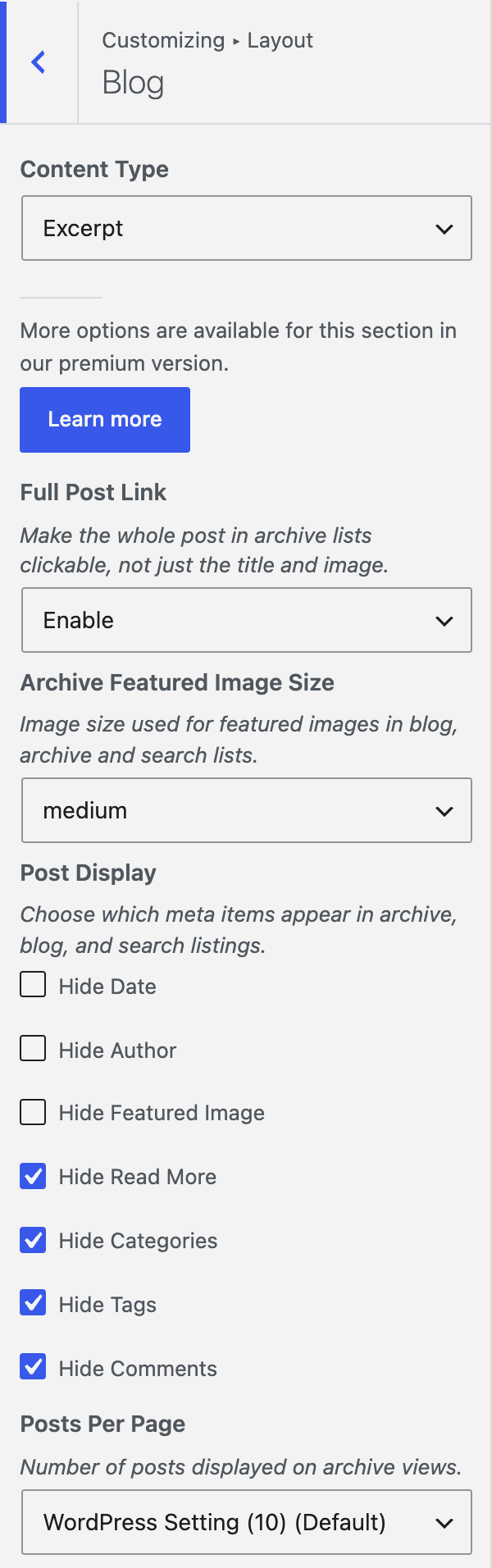
Clickable posts and featured images
| Setting | Options | What it does |
|---|---|---|
| Full Post Link | Disable (default) / Enable | Makes the whole post in a list clickable, not just the title and image. Links in the meta, read more and content stay clickable. |
| Archive Featured Image Size | Full (default), plus every image size registered on your site | Sets the featured image size in lists. |
Hide items in lists
Under Post Display, choose which meta items appear in archive, blog and search listings. Tick a box to hide that item.
| Setting | What it hides |
|---|---|
| Hide Date | The post date. |
| Hide Author | The author name. |
| Hide Featured Image | The featured image. |
| Hide Read More | The read more link. |
| Hide Categories | The categories. |
| Hide Tags | The tags. |
| Hide Comments | The comments link. |
All boxes are unticked by default. They affect lists only; single posts have their own settings.
Posts per page
- Go to Appearance → Customize → Layout → Blog.
- Under Posts Per Page, choose Custom.
- Set a number for each page type.
- Click Publish.
| Setting | Options | What it does |
|---|---|---|
| Posts Per Page | WordPress Setting (Default) / Custom | Number of posts displayed on archive views. The default uses your Settings → Reading value. |
| Blog, Category Archive, Tag Archive, Date Archive, Author Archive, Search Results | Slider from 0 to 100 (shown in Custom mode) | Posts per page for that page type. 0 means the WordPress setting. |
Good to know
- Archive Featured Image Size overrides the image size set in GP Premium’s Blog module, if you use it.
- Hide Read More removes the link text. GP Premium is not needed for any of these options.
- These options work only when GeneratePress is the active theme or the parent theme.